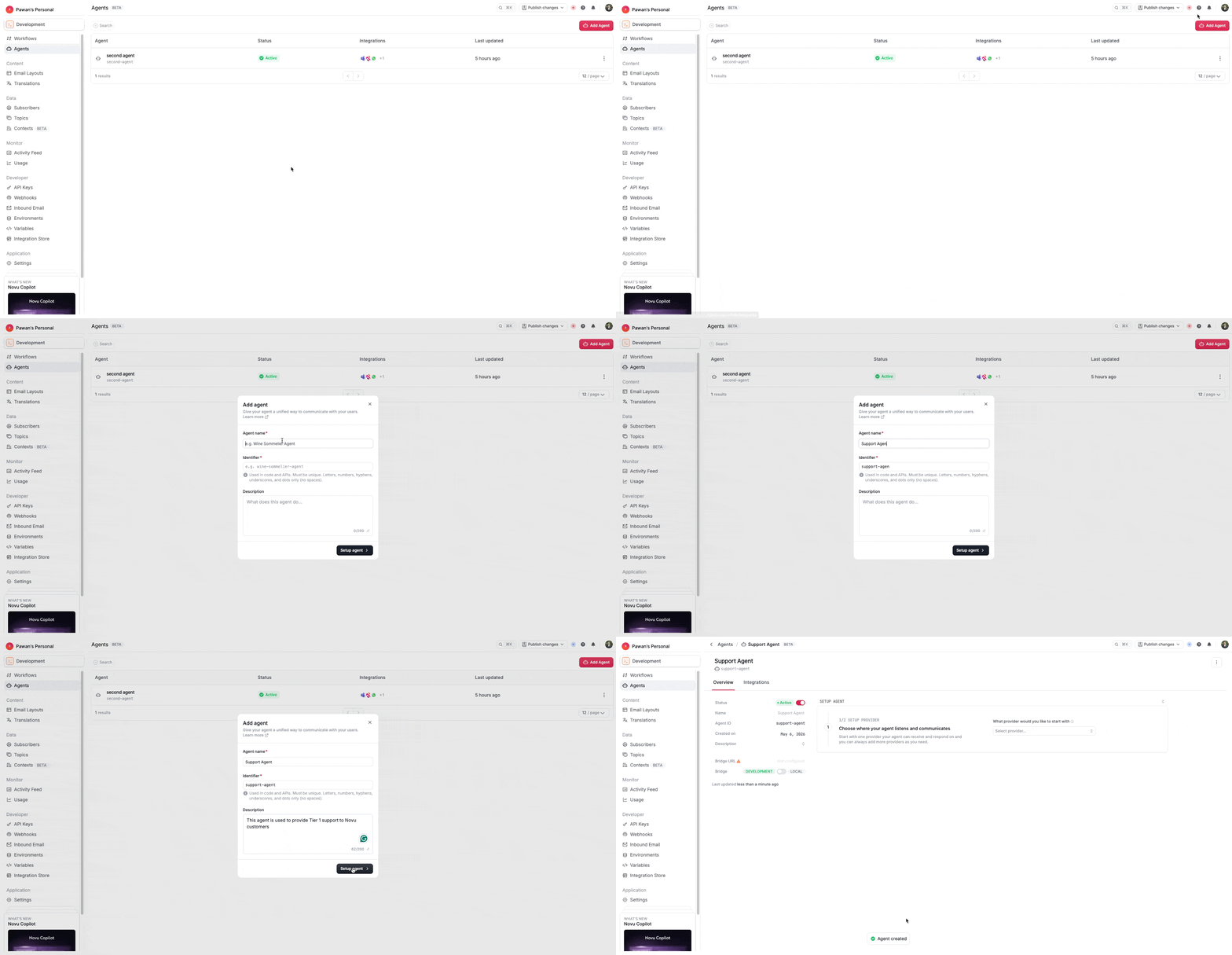
Setup your Agent
Set up your Novu Agent: create an agent and connect providers and wire up your application code.
A conversational agent has the following components:
- Agent Name: The display name shown in the dashboard.
- Agent Identifier: The unique
agentIdused in code and API calls. - Agent Description: A short summary that explains what the agent does.
- Agent Status: The current state of the agent, such as active or inactive.
- Agent Creation Date: The timestamp showing when the agent was created.
- Connected Providers: The chat providers currently connected to the agent, such as Slack or Microsoft Teams.
- Agent Bridge URL: The bridge endpoint used to deliver events to your application.
- Agent Logic (Code): Your handler implementation for events, replies, and signals.
Create a new agent
- To set up your agent, go to the Agents page in the Novu dashboard and click Add Agent.
- Enter a human-readable name for your agent. This name is used in Slack and Microsoft Teams when users mention the agent.
- Novu auto-generates the identifier from the name you provide. This identifier becomes
agentIdand cannot be changed later. - Add a description for your agent to help others understand its purpose.
- Click Create to create the agent.
- After the agent is created, you are redirected to the agent details page.
- For connecting providers to the agent, refer to Connect Providers.