
Novu Agents Signals
Use signals to coordinate state and behavior across your agent integration.
Signals are side-effects your agent can perform in addition to replying. While ctx.reply() sends a message back to the user, signals let you do everything else: persist state, kick off workflows, or close the conversation.
There are three types of signals:
| Signal | What it does | Method |
|---|---|---|
| Metadata | Store key-value data on the conversation (persists across messages) | ctx.metadata.set(key, value) |
| Trigger | Fire a Novu workflow (for example, send an email, push notification) | ctx.trigger(workflowId, options) |
| Resolve | Mark the conversation as resolved, with an optional summary | ctx.resolve(summary?) |
Why signals exist
Signals separate communication (replying to the user) from orchestration (updating state, triggering other systems). This means your agent can do things like tag a conversation with a sentiment score, escalate to a human via an email workflow, and close the conversation, all within a single handler invocation, without sending multiple messages to the user.
How signals are delivered
Signals are not sent immediately when you call them. Instead, they are queued in memory and batched together with your next ctx.reply() call in a single HTTP request. This reduces round-trips and ensures signals and the reply are processed atomically.
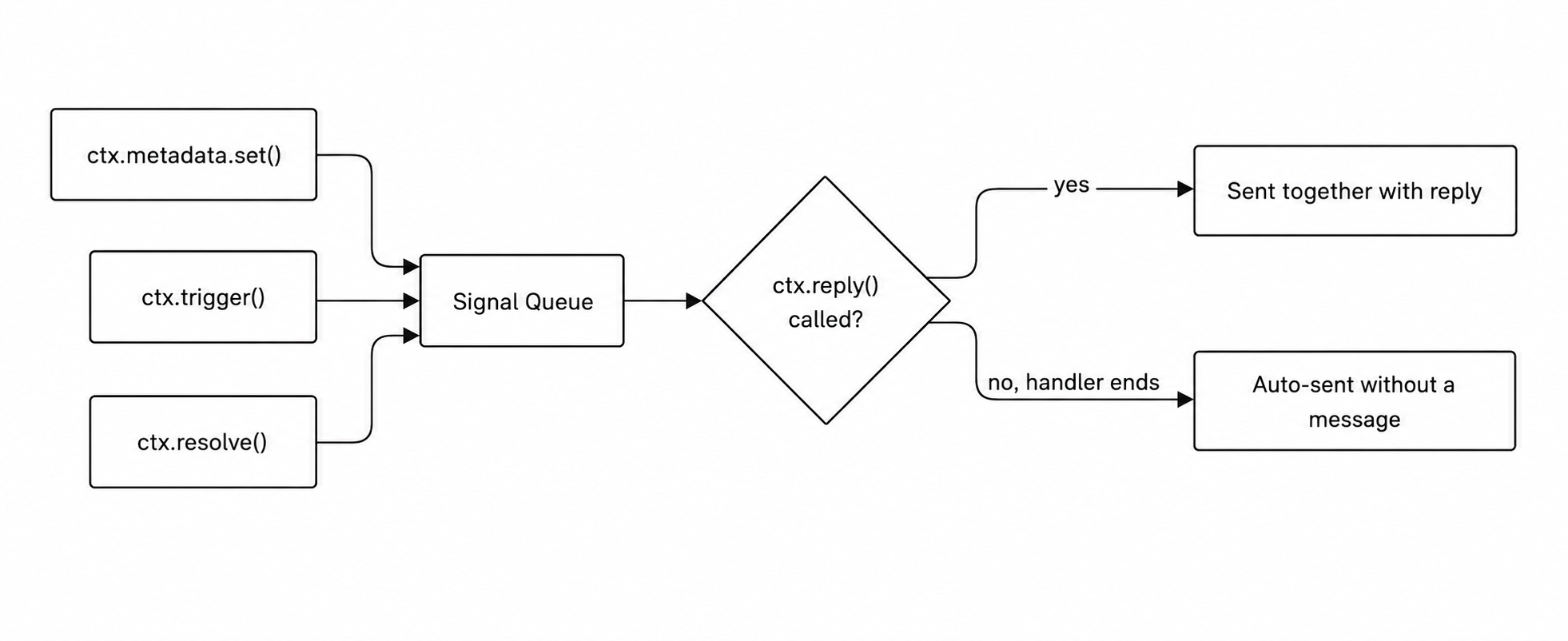
If your handler finishes without calling ctx.reply(), then any pending signals are still sent automatically. They won't be lost.
Set metadata
Store key-value data on the conversation (up to 64 KB cumulative). Metadata persists across messages and is available in ctx.conversation.metadata on every subsequent handler call.
Use metadata to track conversation state across turns: intent classification, ticket IDs, user preferences, escalation flags, or anything your agent needs to remember.
Trigger a workflow
Fire any Novu workflow from within your agent. This bridges agent conversations with the rest of your notification infrastructure. You can send an email, push notification, SMS, or any multi-step workflow.
Common patterns include:
- Escalation emails
- CSAT surveys after resolution
- Alerting on-call teams
- Logging to external systems
Resolve a conversation
Mark the conversation as resolved with an optional summary. This changes the conversation status to resolved, fires the onResolve handler, and stores the summary as a signal activity.
Resolved conversations automatically reopen if the user sends a new message.
Putting it all together
Here's a handler that uses all three signal types in a single turn: