
Novu Agents Handle Events
Handle agent events in your webhooks, handlers, and backend services.
Agents receive events as users interact in a conversation. This page explains the event flow and shows how to handle each event type in your code.
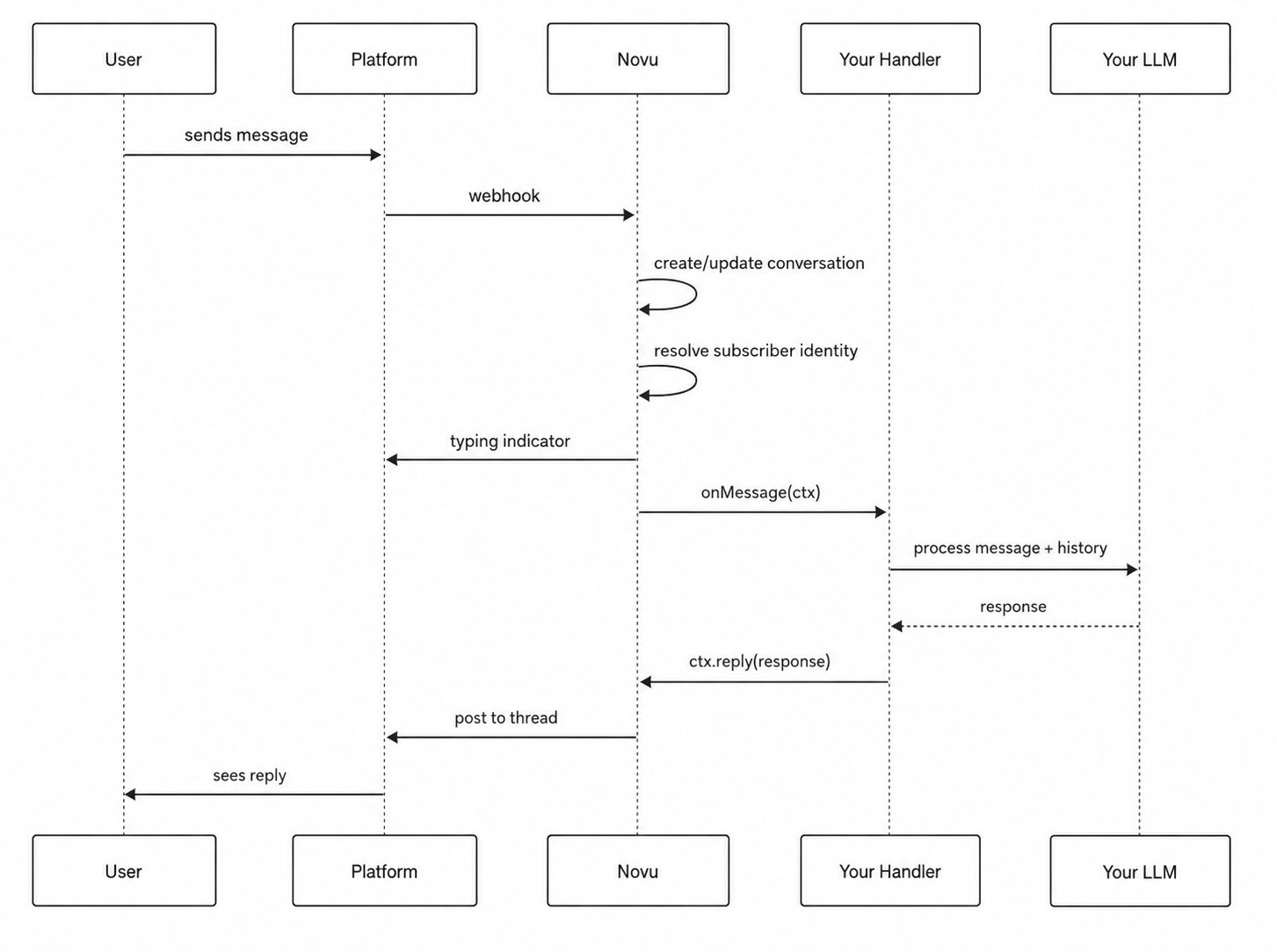
Agent conversation flow
Agent conversation starts when a user sends a message in a conversation with your agent. This message is then processed by the agent and the agent replies to the user. This conversation is then stored in the Novu platform and can be accessed later. Below is the flow of how a conversation works with your agent:
Agent events
A conversational agent responds to four types of events:
| Event | When it fires | Common use case |
|---|---|---|
onMessage | User sends a text message in the thread | Process the message with your LLM and reply |
onAction | User clicks a button or selects a value in an interactive card | Handle form submissions, button clicks, dropdown selections |
onReaction | User adds or removes an emoji reaction on a message | Capture feedback (thumbs up/down), trigger follow-ups |
onResolve | The conversation is marked as resolved | Clean up, log analytics, send a summary email |
onMessage
onMessage is the primary handler event for the agent. It fires every time a user sends a message in a conversation with your agent.
Handling attachments
Inbound messages to the agent can include file attachments (images, documents, audio, video) when the platform supports them. Novu normalizes provider files into ctx.message.attachments with downloadable signed URLs:
Download attachment URLs promptly inside your handler. These signed links are valid for 15 minutes. If a link expires before your agent reads it, then re-request the file through a subsequent event or conversation history where available. Inbound attachments are limited to 25 MB per file.
onAction
onAction event is fired when a user clicks a button or selects a value in an interactive card. For interactive cards, refer to Interactive cards. This event is used to handle form submissions, button clicks, dropdown selections, and more.
onReaction
onReaction event is fired when a user adds or removes an emoji reaction on a message. This event is used to capture feedback (thumbs up/down), trigger follow-ups, and more.
onResolve
onResolve event is fired when the conversation is marked as resolved via ctx.resolve() or the resolve signal is triggered. This event is used to clean up, log analytics, send a summary email, and more.